
Options, grants & vesting
Stand up an option plan, issue ISO or NSO grants, attach the vesting they carry, and record exercises - with a grant notice ready to sign at every step.
Tenacap models the whole equity-compensation lifecycle in app, so you can run a company on it rather than just view an imported snapshot. The path is: authorize a plan, grant options against it, attach a vesting schedule, and - when someone exercises - turn vested options into real shares on the cap table.
Create an option plan
An option plan is the board-authorized pool you grant out of. Open Update on your cap table, choose Option plans, and add one with a name (for example “2024 Plan”), its authorized size, and the board-approval date. A company can run several plans over its life - a 2021 plan, an evergreen top-up - and each keeps its own authorized pool. Every grant draws the pool down, and Tenacap shows authorized, granted, and unallocated per plan plus a rolled-up total.
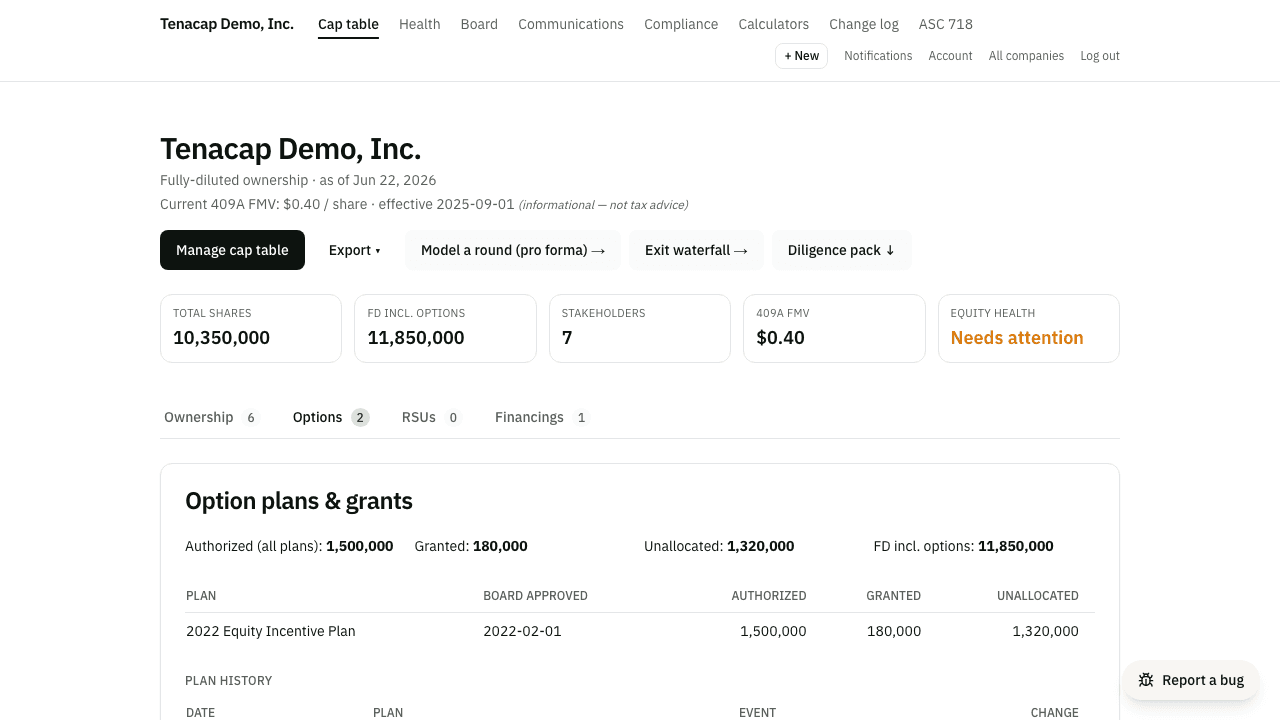
Resizing a plan is a board action, not a silent edit. When you change an authorized pool, Tenacap records it in the plan’s history with a date and a signed change, so counsel can see how the pool grew over time.
Plan details and documents
Each plan has a page of its own under Company → Plans: the reserve the board authorized, what has been granted from it, what is left, and the documents behind it - the plan itself, the board resolution adopting it, the stockholder approval, any amendment. Attach them there; downloads are limited to admins, editors and whoever uploaded a file, and each is logged. The figures are the same ones the options tab shows; adding or editing a plan stays on the update page. Until a plan has its document, the company overview and the end of an import carry an Attach the plan document step that links here.
Issue ISO & NSO grants
A grant is issued to a stakeholder against a specific plan. From the grant form, pick the grantee and plan, then enter the quantity, strike price, grant date, expiration date, and the grant type - ISO (incentive stock option) or NSO(non-qualified stock option). Tenacap validates that the grant plus everything already granted stays within the plan’s authorized pool.
Three dates on the form usually match and sometimes do not, so each has its own field. The grant date is the date the grant was made - normally the day the board approved it. The board approval date follows the grant date until you change it; leave it filled and Tenacap records the approval on the Board page, linked to the grant, so the equity-health check sees it. Clear it if the board has not approved yet. The vesting start (the vesting commencement date) is often the hire date, which can be weeks or months before the grant; it follows the grant date until you set it. Once the grant lands the form says so and offers to send it for signature.
Each grant on the update page has an Attach control for the paper that goes with it - the grant agreement, the board consent, a countersigned notice - and everything attached shows on the holder’s page under Documents, beside any notice they signed through Tenacap. A share certificate row on the stakeholder page takes the signed certificate the same way.
Standard & custom vesting
Every grant can carry a vesting schedule, built inline as you issue it or attached later. There are two kinds:
- Standard - a cliff plus a linear schedule: cliff months, total months, and a vesting frequency. The classic four-year grant with a one-year cliff vesting monthly is a standard schedule.
- Custom - dated milestone tranches, each with a fraction of the total. Use this for performance or board-dated vesting that doesn’t follow a single linear curve.
Vested and unvested counts are computed, not stored - Tenacap derives them as of today from the schedule, so the cap table and each holder’s view always reflect the current state.
Acceleration, pause & resume
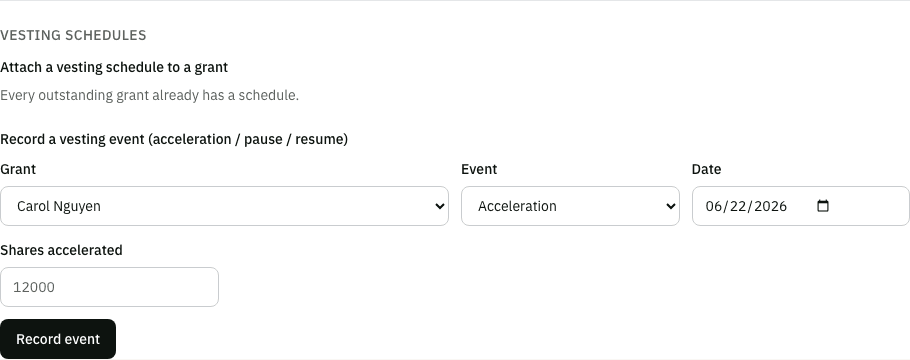
Real grants change. Tenacap records vesting lifecycle events rather than editing past vesting, so the history stays an immutable, exportable log:
- Acceleration - single- or double-trigger. When the trigger fires, you record an acceleration event for a quantity; acceleration only ever raises vesting, and the regular schedule catching up later never double-counts.
- Pause & resume - a leave of absence. A pause stops the linear clock and a resume restarts it, shifting the standard schedule back by the paused months.
Whether a change of control or termination happened is your call to record - Tenacap keeps the vesting math itself pure and deterministic, then replays your recorded events on top of it.
When an import disagrees with the schedule
Vested and unvested counts are normally computed straight from a grant’s schedule - derived, not stored. Imported grants are the one exception that needs a human answer: if your prior platform reported a different vested figure than Tenacap’s own schedule recomputes, the mismatch usually means something happened in the real world that a schedule alone can’t see - a stop-vest, a leave of absence the platform tracked differently, or a negotiated modification.
A grant like that is flagged on the stakeholder page, with both numbers stated plainly and two questions to choose between: vesting stopped here (the reported figure is final, and nothing more vests unless you edit the grant), or vesting paused and has resumed (the reported figure was correct as of that date, and vesting continues from there on the original schedule). Whichever you pick takes effect everywhere at once - the cap table, this holder’s page, the ISO $100k / Form 3921 view, and the vesting calendar all agree from then on. A grant nobody has answered about keeps showing Tenacap’s own schedule figure, as before.
Early exercise & recording exercises
If a grant is flagged for early exercise, the holder can exercise options before they vest. Early-exercised shares are issued as restricted stock that carries the grant’s vesting - which is when an 83(b) election matters; see Restricted stock for that filing.
When someone exercises, use Record exercise on the grant. Tenacap draws down the grant’s outstanding options and issues that many shares of the underlying class to the grantee at the strike price - a real issuance on the cap table, with the hash-chained ledger and totals reconciling like any other. Each holder’s own view in the stakeholder portal shows their grant’s expiration date and a days-remaining countdown, flagging one that has already lapsed.
The holder rows on the options tab read the way Carta’s do. Granted is the size of the grant - what the plan was drawn down by, and it stays there after an exercise, because exercised options still count against the plan. Vested is cumulative, including anything since exercised. Exercised is what became shares. Outstanding is what can still be exercised - the only one of these that counts in fully diluted, since exercised options are already common stock. A fully exercised grant reads granted, vested and exercised all equal, and outstanding 0.
When a holder departs
Marking a stakeholder as departed stops their vesting. For a grant you created in Tenacap, the unvested part returns to the plan straight away. For a grant that came in from an import, Tenacap trusts the platform you imported from: the unvested part stays on the grant, and in fully diluted, until that platform reported it cancelled or you confirm the lapse - so the figures here keep matching the ones you left behind. Their vested, unexercised options stay theirs for the post-termination exercise window - 90 days unless you set a different number on the stakeholder. What happens when that window closes depends on when Tenacap learned of the departure.
If the window had already closed when you recorded the departure - you entered a date from years ago, or an import carried it - the options lapsed before Tenacap could have recorded an exercise, so it lapses them on its own: the holder shows 0, the unexercised options are back in the plan, and the grant row reads Lapsed with the date. If they did buy their shares, use Record exercise and the row comes back.
If the window closes while Tenacap is your record, it does not zero the options by itself. The stakeholder page and the update page say the window has closed with no answer on file, and Tenacap keeps counting the options in the plan and in fully diluted until you answer one of two ways: Exercise, if they bought their shares, or Confirm lapsed, which marks the grant lapsed and returns its shares to the plan. Reminders go to the company admins when the window opens, 14 and 3 days before it closes, and when it has closed with no answer. The reason it waits for you: an exercise that happened but was never recorded is the more common mistake, and a system of record should not quietly remove a shareholder.
Grant notices
For any grant you can generate a Notice of Grant - a PDF built from the grant’s own terms (plan, quantity, strike, dates, and vesting). The same document powers the e-sign request, so what the grantee signs is what you reviewed. Send it for signature straight from Tenacap; the full signing flow is covered in Documents & e-signature.