
Export & open schema
Your cap table is yours. Tenacap exports the whole thing in one click - as a spreadsheet, as a single open-schema JSON file, as a checksummed zip of the cap table, or as one complete archive of every record and document with a manifest you can verify - so you can back it up, hand it to your accountant, or walk away entirely. These are reports you keep, not files you edit and upload back.
“One-click export, open schema, no lock-in” is a promise written into our terms, not a marketing line. Every Tenacap account can pull its complete state out at any time, in a format that’s openly documented and licensed so any tool - or your own accountant - can read it without asking us. This article covers how to do it and what you get.
How to export
The export buttons live on your cap-table view. Open the company, find the export controls in the toolbar, and choose a format. The CSV, JSON and cap-table zip download straight to your machine - there’s no job queue and nothing to wait for. The complete archive is built in steps while you watch, then downloads; a company with many documents takes a minute or two. The data is always scoped to the one company you’re looking at.
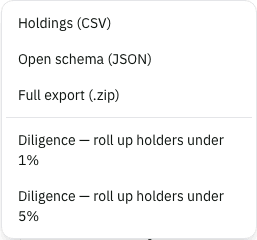
The four formats
Pick the one that matches what you’re doing:
- CSV - a flattened sheet of your outstanding shares (stakeholder, share class, certificate, quantity, price, issue date) that opens straight in Excel or Google Sheets. Six columns, one row per outstanding security. Best for a quick look or a one-off analysis. Deliberately narrow: it leaves out option grants, SAFEs and convertible notes, unissued pool shares, and anything cancelled or transferred away - so its share total is smaller than your fully-diluted total, and it is not the file to hand someone who needs the whole picture. Use the JSON for that.
- JSON - the complete
cap-table.json: every share class, stakeholder, security, convertible, transaction, and audit-log entry, in our open schema. This is the full picture. - Cap table with checksums (.zip) - the validated
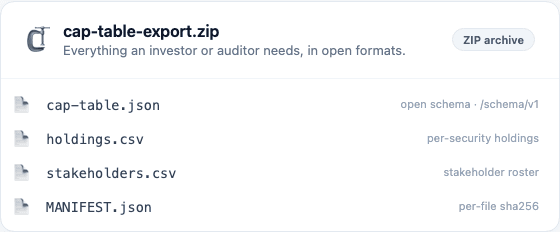
cap-table.json, the two CSV sheets, and aMANIFEST.jsonthat fingerprints every file. Cap-table data only - a quick, small, self-verifying snapshot. - Complete archive (.zip) - everything Tenacap holds for the company: the same cap-table files, plus every board approval, consent, financing, 409A, tax record, option pool, signature request and signer record, prior cap-table version and audit entry as JSON, plus the documents themselves - sealed signature PDFs, uploaded documents, 409A reports, attached files, and the export you originally imported from - each fingerprinted in a manifest, with a coverage report that says what the database held next to what was written. This is the file to keep if you ever leave, and the one to hand to counsel.
What’s in the complete archive
Open it and the first file is README.md, which explains everything below without Tenacap. Then MANIFEST.json: one entry per file with its path, byte size, SHA-256 checksum and a status. And COVERAGE.json: for every kind of record we store, the number of rows in the database when the archive was built next to the number written into it, so “complete” is a checked fact, not a word. The four operational tables we leave out (request de-duplication keys, a derived cache, a certificate counter, and the archive job itself) are named there with a reason each.
Then the records: cap-table.json in the open v1 schema, the two CSV sheets, and six sibling files - governance.json, valuations.json, tax.json, equity-extras.json, documents.json and history.json - holding the raw rows of every table, with every share count and every amount as a decimal string so nothing rounds. Where a row concerns a person or a security it also names them in words (legal name, email, certificate number, share class, quantity, issue date), and says whether that link was recorded at the time or reconstructed when the archive was built. A schema/ folder holds JSON Schema for every one of these files.
Then the documents, under documents/: sealed signature PDFs, the documents you sent for signature, 409A reports we stored, files attached to grants and approvals, and the Carta, Pulley or Mantle export you imported from. Each is copied exactly as stored and hashed. Re-hash any file, compare it to the manifest, and you have proof it hasn’t been altered since Tenacap wrote it.
What the archive does not hold yet. A signed agreement with the signatures stamped onto its pages. Today a sealed PDF is the agreement as sent plus a certificate page; freezing the document at send and stamping it at completion is a separate change we are building, and until it ships the archive labels what it holds as a sealed copy, not as an executed original.
The open, versioned schema
The JSON export conforms to the Tenacap open schema: version v1, published under Apache-2.0, and versioned with semver. It isn’t a private format you have to reverse-engineer - every section is documented field by field on our public open-schema reference, and any breaking change comes with a major-version bump and a six-month deprecation window. The full structure, an annotated sample, and the governance rules all live there.
Backup, portability & migration
Exports are for taking your data out - to back it up, to hand to your accountant or counsel, to load into another tool, or to walk away entirely. The JSON is complete for the cap table and the complete archive is complete for everything, and both are self-verifying: keep a copy in your own storage and you hold a full snapshot of your ownership records and documents that doesn’t depend on us being around. Every field is documented on the public open-schema reference and in the archive’s own schema/ folder, so anyone can read it without our help.
Migration out is the case we do support. If you ever move to another tool, hand it the open-schema JSON; if you’re coming the other way, see Importing your cap table. We even publish migration guides that take you away from Tenacap - the point of an open format is that your records outlive your choice of vendor.